
October 2, 2026 0 Comments
GST E-Invoice Correction: 24-Hour Rule and Beyond
Introduction
GST e-invoicing is an important part of India’s GST compliance system. It helps businesses report their B2B invoices electronically and generate an Invoice Reference Number (IRN) through the Invoice Registration Portal (IRP).
Sometimes businesses make mistakes while generating e-invoices. Common errors include:
Incorrect GSTIN of the buyer or seller.
Wrong invoice number or invoice date.
Incorrect taxable value or GST amount.
Wrong HSN code.
Incorrect quantity or tax rate.
Wrong place of supply.
One important point every taxpayer should understand is that once an IRN is generated, the e-invoice cannot be directly edited or amended on the IRP portal.
However, the correction process depends on when the mistake is identified and the nature of the error.
Let’s understand the complete process in simple language.
1. What Is the 24-Hour Rule in GST E-Invoicing?
After generating an IRN, taxpayers generally have 24 hours to cancel the e-invoice through the IRP.
If an invoice contains incorrect information and the mistake is identified within 24 hours, the taxpayer can cancel the complete IRN and generate a fresh e-invoice with the correct details.
Important points:
Partial cancellation of an e-invoice is not allowed.
The complete IRN must be cancelled.
An already generated IRN cannot be edited.
The same cancelled invoice number cannot be reused in the same financial year.
If an e-Way Bill is linked to the invoice, its status must also be checked before cancellation.
2. Steps to Correct an E-Invoice Within 24 Hours
Follow these steps when an error is identified within the permitted cancellation period.
Step 1: Check the e-Way Bill
If an active e-Way Bill is linked to the e-invoice, cancel the e-Way Bill first, subject to the applicable cancellation conditions.
Step 2: Cancel the IRN
Log in to the Invoice Registration Portal (IRP).
Select the e-invoice cancellation option.
Enter the required details.
Cancel the complete invoice.
Step 3: Correct the Invoice in Your ERP
Make the necessary corrections in your accounting software, such as Tally, SAP or other ERP software.
Step 4: Generate a Fresh IRN
Prepare a new invoice with the correct details and generate a fresh IRN.
Remember that the cancelled invoice number cannot be reused for generating another IRN.
3. What If 24 Hours Have Already Passed?
This is an important situation for GST practitioners and accountants.
Once 24 hours have passed, the IRP does not provide an option to cancel the IRN through the normal cancellation facility.
In such cases, the taxpayer should identify the type of mistake and follow the appropriate GST correction procedure.
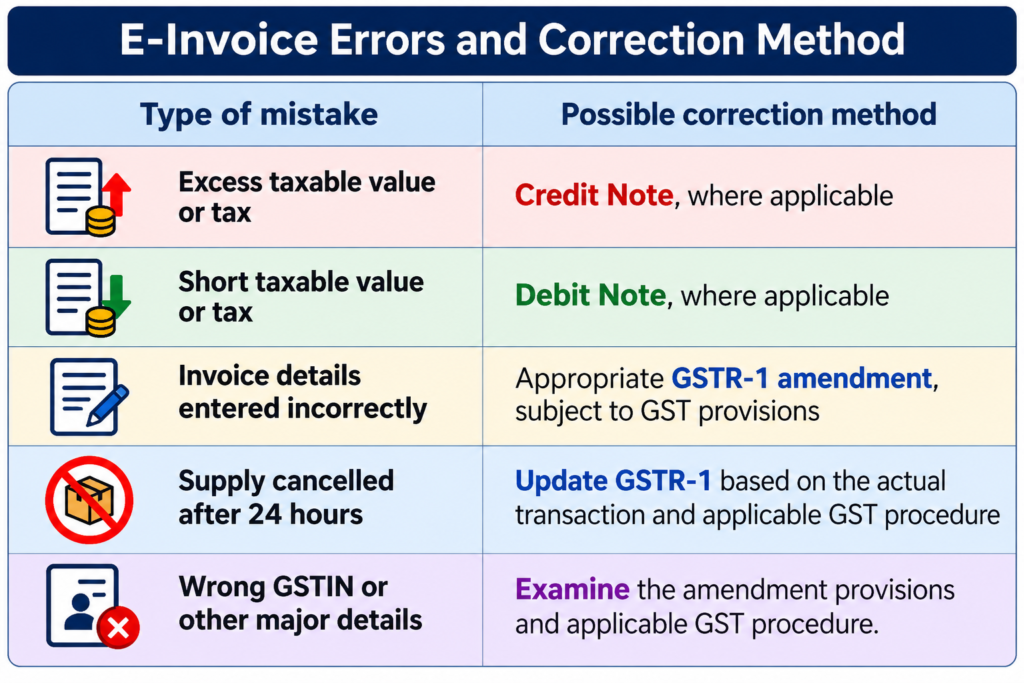
Important: Credit notes and debit notes should not be used as a common solution for every e-invoice error. The correction method depends on the actual transaction and the nature of the mistake.
GSTN guidance also explains that invoice details reported on the IRP can be corrected through the GST portal in GSTR-1, subject to the applicable provisions.
4. Difference Between Credit Note and Debit Note
Credit notes and debit notes are important documents used to make adjustments in taxable value and tax liability.
Credit Note – Section 34 of CGST Act
A credit note may be issued when:
Taxable value or tax charged is more than the actual amount.
Goods are returned by the customer.
Goods or services are deficient.
The original supply is cancelled and the statutory conditions are satisfied.
Debit Note – Section 34 of CGST Act
A debit note may be issued when:
Taxable value charged is less than the actual value.
GST charged is less than the applicable tax.
Additional consideration is required to be charged.
Both documents must be properly reported in the GST returns, wherever applicable.
5. GSTR-1 Amendment Is Different from IRP Amendment
Many taxpayers misunderstand this point.
Changing invoice details in GSTR-1 does not mean that the original e-invoice has been edited on the IRP.
For example:
A supplier generates an e-invoice with a taxable value of ₹1,00,000 instead of the correct taxable value of ₹1,20,000.
After 24 hours, the supplier cannot edit the original IRN on the IRP.
However, the supplier must examine the applicable GSTR-1 amendment or debit note procedure to correctly report the transaction.
The original IRN and signed QR code do not change merely because a return-level correction is made.
Therefore, taxpayers should maintain proper supporting documents and reconciliation records.
6. Important Update: 30-Day E-Invoice Reporting Rule
From 1 April 2025, GSTN introduced a 30-day reporting restriction for taxpayers having Annual Aggregate Turnover (AATO) of ₹10 crore or more.
Under this requirement:
Taxpayers with AATO of ₹10 crore and above must report applicable e-invoices within 30 days from the document date.
This restriction applies to invoices, credit notes and debit notes requiring IRN generation.
IRP will restrict reporting of documents beyond the prescribed 30-day period.
Taxpayers with AATO below ₹10 crore are not covered by this particular 30-day restriction as per the advisory.
Example:
If a taxpayer covered by this restriction issues an invoice dated 1 April 2025, the invoice must be reported on the IRP within the prescribed 30-day period, i.e., by 30 April 2025.
This 30-day rule is a reporting deadline. It is different from the 24-hour IRN cancellation rule.
7. Checklist Before Correcting an E-Invoice
Before taking any correction action, verify the following details:
IRN generation date and time.
Whether the 24-hour cancellation window is still open.
Whether an e-Way Bill is generated.
Whether the e-Way Bill is active or cancelled.
Whether GSTR-1 has already been filed.
Whether the error relates to taxable value, tax rate, GSTIN or invoice number.
Whether a credit note, debit note or return amendment is applicable.
Whether the buyer has received the original invoice.
Inform the buyer in writing about the correction and provide the relevant supporting documents.
8. Common Mistakes to Avoid
GST practitioners should avoid these mistakes:
Trying to edit an already generated IRN.
Attempting partial cancellation of an e-invoice.
Reusing a cancelled invoice number for a new IRN.
Ignoring the linked e-Way Bill before cancellation.
Assuming that GSTR-1 amendment changes the original IRN.
Issuing credit notes without checking whether they are legally applicable.
Ignoring the 30-day reporting restriction for eligible taxpayers.
Conclusion
Correcting GST e-invoices requires proper understanding of IRP rules and GST return procedures.
Remember these three important points:
Within 24 hours: Cancel the complete IRN, subject to the applicable conditions, and generate a fresh invoice with a new document number.
After 24 hours: Use the appropriate GST return amendment or credit/debit note mechanism depending on the nature of the error.
From 1 April 2025: Taxpayers with AATO of ₹10 crore or more must follow the 30-day IRN reporting restriction.
Proper invoice verification before generating an IRN can help businesses avoid unnecessary corrections, reconciliation problems and GST compliance risks.
Disclaimer: This article is for educational purposes. Taxpayers should refer to the latest GST laws, notifications, circulars and GSTN advisories before taking action.